Insulin Calc1.4
Publisher Description
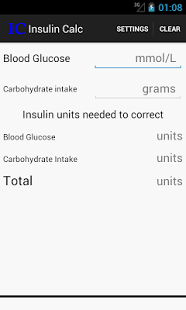
Calculate the Insulin Units required to stabilize the Blood Glucose Level for Diabetes Type 1 patients taking the current blood glucose level and carbohydrates intake into consideration.
This app was created in collaboration with Diabetes UK by Dr. Pavan Bandhu and was developed by Jagdeep Nagpal (Oxford Brookes - MSc. Computer Science & Newcastle University BSc. Computer Science)
An app tester of Insulin Calc said "..Good app that is quick and easy to use. Informative and accurate for readings. Recommended to other users.."
This app is intended to be used only by diabetes Type 1 patients.
Your valuable feedback will be greatly appreciated. Feel free to email me any time to jagdeepnagpal@gmail.com with subject "Insulin Calc". Thank you.
This app was developed for the Diabetes App Challenge to support young people with diabetes get the best out of their appointments (funded by Diabetes UK & run by Plymouth University & Peninsula School of Medicine & Dentistry)
----------------
previous changes
----------------
v1.3
Optimised for ICS and Jelly Bean
UI optimisations
v1.2.2
settings->save button added
v1.2.1
fixed settings layout
v1.2
fixed layout
v1.1
Modified the calculation
Fields turn red when Insulin value is more than 20
Clear button added
Decimal formatted to 2 decimal places
v1.0
Initial release with the insulin calculator
About Insulin Calc
The company that develops Insulin Calc is Jagdeep Nagpal. The latest version released by its developer is 1.4. This app was rated by 1 users of our site and has an average rating of 4.0.
To install Insulin Calc on your Android device, just click the green Continue To App button above to start the installation process. The app is listed on our website since 2013-10-04 and was downloaded 11 times. We have already checked if the download link is safe, however for your own protection we recommend that you scan the downloaded app with your antivirus. Your antivirus may detect the Insulin Calc as malware as malware if the download link to com.insulin.calc is broken.
How to install Insulin Calc on your Android device:
- Click on the Continue To App button on our website. This will redirect you to Google Play.
- Once the Insulin Calc is shown in the Google Play listing of your Android device, you can start its download and installation. Tap on the Install button located below the search bar and to the right of the app icon.
- A pop-up window with the permissions required by Insulin Calc will be shown. Click on Accept to continue the process.
- Insulin Calc will be downloaded onto your device, displaying a progress. Once the download completes, the installation will start and you'll get a notification after the installation is finished.
Program Details
System requirements
Download information
Pricing
Version History
version 1.4
posted on 2013-10-04
version 1.4
posted on 2013-03-29
Several fixes and updates
